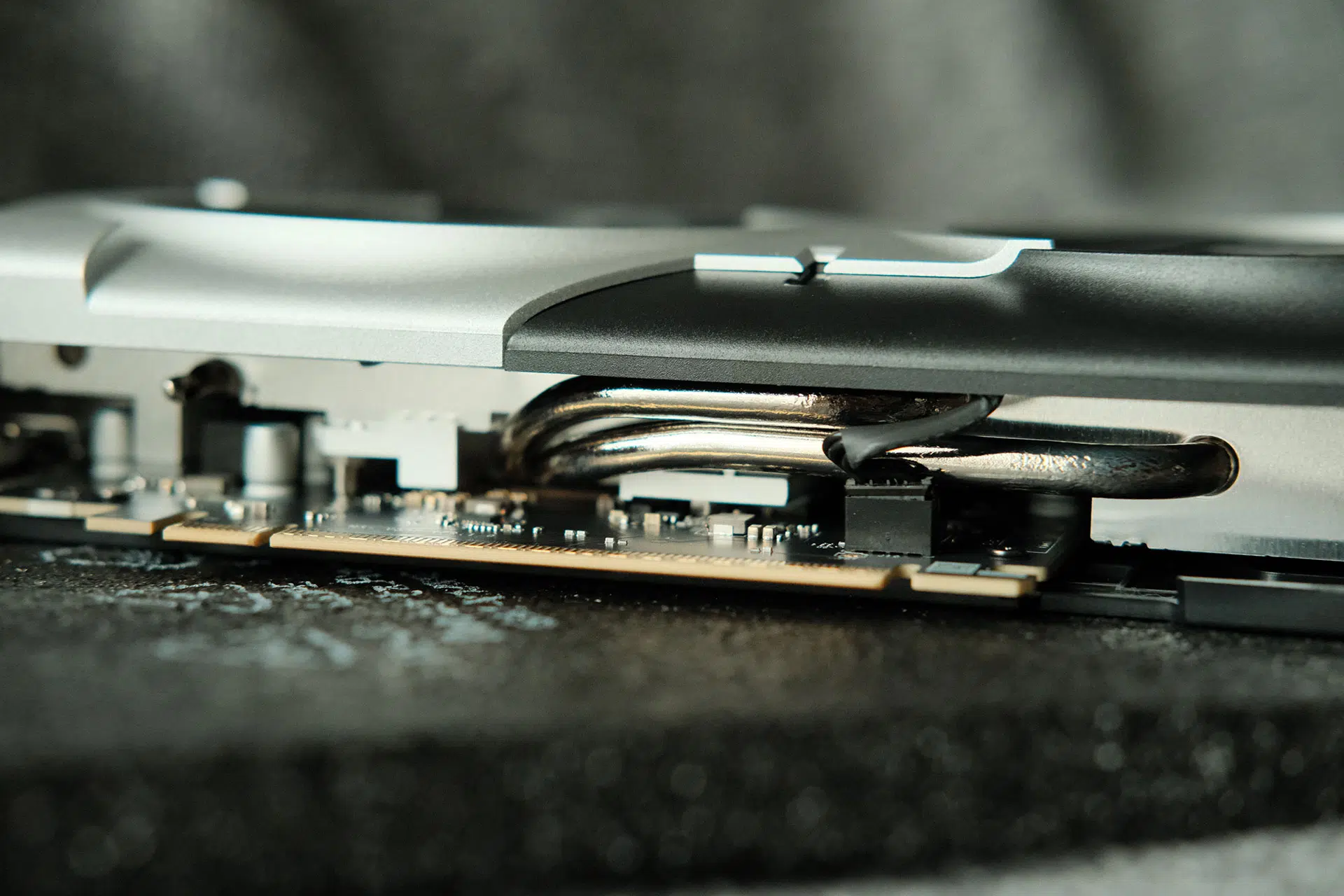
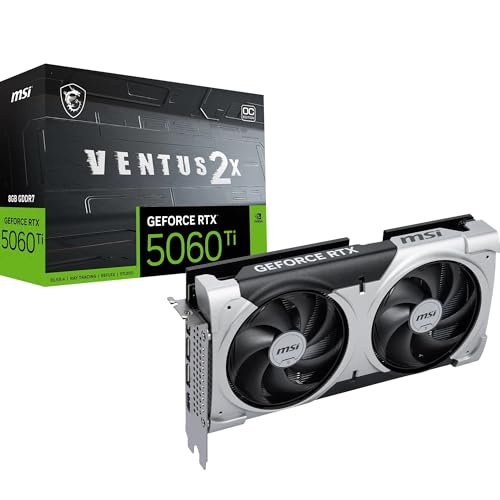
The NVIDIA GeForce RTX 5060 Ti is one of the most exciting mid-range graphics cards NVIDIA has released in recent years. Built on the new Blackwell architecture, it brings faster GDDR7 memory, improved ray tracing performance, DLSS 4 with Multi Frame Generation, and AI-powered enhancements that make modern games smoother than ever.
After upgrading from an RTX 3050 to the MSI GeForce RTX 5060 Ti Ventus 8GB 2X OC Plus Edition, I immediately noticed a dramatic difference in everyday gaming. Games that previously struggled to maintain smooth frame rates on my 34-inch ultrawide gaming monitor now run comfortably above 60 FPS while delivering noticeably better image quality.
This RTX 5060 Ti review is based on my real-world gaming experience rather than synthetic benchmarks alone. If you’re considering upgrading your graphics card, here’s everything you need to know.
RTX 5060 Ti Ventus 2X OC Plus Specifications
| Specification |
RTX 5060 Ti |
| Architecture |
NVIDIA Blackwell |
| CUDA Cores |
4,608 |
| Core Clocks |
Extreme Performance: 2617 MHz (MSI Center)
Boost: 2602 MHz |
| Memory |
8GB or 16GB GDDR7 |
| Interface |
PCI Express® Gen 5 x16 (uses x8) |
| Recommended PSU |
600 W |
| DLSS |
DLSS 4 |
| Ray Tracing |
4th Generation RT Cores |
| Tensor Cores |
5th Generation |
| Outputs |
DisplayPort x 3 (v2.1b)
HDMI™ x 1 (As specified in HDMI™ 2.1b: up to 4K 480Hz or 8K 120Hz with DSC, Gaming VRR, HDR) |
The biggest improvements aren’t just the increase in CUDA cores but the move to Blackwell architecture, much faster GDDR7 memory, and support for DLSS 4. Together, these upgrades deliver a substantial improvement in real-world gaming compared to previous mid-range GPUs.
Design and Build Quality
I’m using the MSI GeForce RTX 5060 Ti Ventus dual-fan model, and it has impressed me with its solid build quality. The card feels sturdy without being oversized, making installation easy in most mid-tower PC cases.
The dual-fan cooling system keeps temperatures well under control while remaining relatively quiet under load. Even after several hours of gaming, temperatures remained comfortable, and the cooler never became excessively loud.
Another advantage is its modest power requirements. Unlike many high-end GPUs, upgrading to the RTX 5060 Ti doesn’t require an expensive power supply upgrade, making it a practical choice for many existing gaming PCs.
RTX 5060 Ti Gaming Performance
Gaming performance is undoubtedly the biggest reason to consider this graphics card.
Compared to my RTX 3050, the upgrade feels transformative rather than incremental. Games that previously hovered around 40 FPS on my 3440×1440 ultrawide display now comfortably exceed 60 FPS, and many titles surpass 100 FPS once DLSS Frame Generation is enabled.
Loading times also feel snappier, and overall gameplay is much smoother thanks to the card’s stronger GPU architecture and faster memory.
RTX 5060 Ti 1440p Performance
One concern many gamers have is whether the RTX 5060 Ti is powerful enough for 1440p gaming.
From my experience, the answer is yes.
Even on a demanding 34-inch ultrawide monitor running at 3440×1440 resolution, the card handles modern AAA games surprisingly well when paired with DLSS Quality mode.
For standard 2560×1440 gaming, players can expect even better performance, making this one of the strongest value GPUs currently available for 1440p.
Where Winds Meet Performance
The first title I tested after upgrading was Where Winds Meet. Check out the best graphic settings for the game.
Running at 3440×1440 Ultra Settings with DLSS Quality, I recorded the following results:
- Solo gameplay: 60–80 FPS
- Online mode: 30–75 FPS
- Indoor areas: 70–78 FPS
- Boss fights: 100–110 FPS
After enabling NVIDIA Frame Generation, frame rates increased dramatically to around 100–164 FPS, making gameplay incredibly fluid.
Considering how demanding ultrawide gaming can be, these results exceeded my expectations.
DLSS 4 Makes a Huge Difference
One of the standout features of this RTX 5060 Ti review is DLSS 4.
Rather than relying solely on raw GPU power, DLSS intelligently reconstructs frames using AI while maintaining impressive image quality. Multi Frame Generation further boosts frame rates in supported titles, delivering a smoother gaming experience with minimal visual compromise.
Interestingly, I found that leaving the DLSS Super Resolution model on each game’s default setting consistently produced better image quality than forcing different presets through the NVIDIA App. This mirrors the experience many other RTX 5060 Ti owners have reported.
As more games continue to add DLSS 4 support, the value of this GPU will only improve.
Ray Tracing Performance
Ray tracing has historically been challenging for mid-range graphics cards, but the RTX 5060 Ti performs far better than its predecessors.
Thanks to fourth-generation RT Cores and DLSS 4, enabling ray tracing no longer results in the severe performance drops many gamers experienced on older RTX cards.
Lighting, reflections, shadows, and global illumination appear far more realistic while still maintaining smooth gameplay in many modern titles.
RTX 5060 Ti for Ultrawide Gaming
Ultrawide gaming is considerably more demanding than standard 1440p due to the increased pixel count.
Before upgrading, my RTX 3050 often struggled to maintain enjoyable frame rates in newer games. With the RTX 5060 Ti, gaming at 3440×1440 has become far more enjoyable.
Most modern titles comfortably exceed 60 FPS with optimized settings, while DLSS and Frame Generation push supported games well beyond the 100 FPS mark.
If you’re using a 34-inch ultrawide monitor, this GPU delivers an excellent balance between performance and price.
You can try adjust and fine-tune the graphic settings in Nvidia App to match your gaming performance.
Content Creation and AI Performance
The RTX 5060 Ti isn’t designed solely for gaming.
Adobe Lightroom feels noticeably more responsive during photo editing, while video editing applications benefit from NVIDIA’s updated NVENC encoder.
The fifth-generation Tensor Cores also accelerate AI-assisted workloads, including image generation, video enhancement, and other machine learning tasks.
For creators who game as well, this GPU offers impressive versatility.
Power Consumption and Cooling
Power efficiency is another pleasant surprise.
Even under heavy gaming workloads, the MSI Ventus Stormforce fan cooler maintained excellent thermal performance while keeping noise levels low.
The GPU remained stable throughout long gaming sessions without excessive fan speeds or thermal throttling.
Undervolting Keeps the GPU Cool
One of the best results during my testing was how well the RTX 5060 Ti responded to undervolting with MSI Afterburner. After fine-tuning the voltage curve with some simple tutorial video, I was able to keep the card completely stable while reducing power consumption and heat without sacrificing noticeable gaming performance.
During extended gaming sessions, the GPU now stays below 70°C most of the time, compared to the mid-70s before undervolting. Lower temperatures also mean the fans don’t need to spin as fast, making the system noticeably quieter.
If you enjoy tweaking your hardware, I highly recommend spending a little time finding a stable undervolt. It’s one of the easiest ways to improve thermals, reduce fan noise, and maintain excellent gaming performance while making the cooler even more efficient.
RTX 5060 Ti Benchmark Experience
Although synthetic benchmark scores are useful for comparisons, my focus has been real-world gaming.
Across multiple modern titles, gameplay feels significantly smoother than it did with the RTX 3050. Frame pacing has improved, loading feels more responsive, and DLSS 4 allows demanding games to maintain high frame rates even at ultrawide resolutions.
For most gamers, these practical improvements matter far more than benchmark charts.
Should You Buy the 8GB or 16GB Version?
If your budget allows, I recommend purchasing the 16GB version.
Modern AAA games continue using more VRAM, especially when running high-resolution textures at 1440p or ultrawide resolutions.
That said, the 8GB model still performs very well today. If you’re primarily gaming at 1080p or optimized 1440p settings, it remains an excellent value.
However, buyers planning to keep their graphics card for several years may appreciate the additional headroom offered by the 16GB version.
Is the RTX 5060 Ti Worth Buying?
The answer depends on your current graphics card.
Upgrade if you currently own:
- RTX 2060
- RTX 3050
- RTX 3060
- GTX 1660
- GTX 1070
- RTX 2070
These users will experience a significant jump in gaming performance while gaining access to DLSS 4, Multi Frame Generation, improved ray tracing, Blackwell architecture, and better AI acceleration.
Skip the upgrade if you already own:
- RTX 4070
- RTX 4070 Super
- RTX 5070
The performance improvement may not justify the cost unless you specifically want Blackwell’s latest AI features.
Pros and Cons
Pros
- Excellent 1080p and 1440p gaming performance
- Outstanding DLSS 4 implementation
- Strong ray tracing capabilities
- Fast GDDR7 memory
- Quiet MSI Ventus cooling system
- Excellent undervolting potential
- Runs below 70°C after a successful undervolt
- Great upgrade from RTX 20-series and RTX 30-series cards
Cons
- 8GB VRAM could become limiting in future AAA games
- Native raster improvements are smaller than DLSS gains
- Online games can still experience FPS fluctuations depending on server conditions
Final Verdict
After spending considerable time gaming with the MSI GeForce RTX 5060 Ti Ventus 2X OC Plus, I can confidently say this has been one of the most satisfying GPU upgrades I’ve made.
Coming from an RTX 3050, the improvement in overall responsiveness, frame rates, and image quality is immediately noticeable. DLSS 4 and Multi Frame Generation significantly enhance gaming performance, while Blackwell architecture, GDDR7 memory, and improved ray tracing provide a modern feature set that should remain relevant for years.
Successfully undervolting the card and keeping temperatures below 70°C only made the experience better, resulting in lower power consumption, quieter operation, and consistently smooth performance.
If you’re upgrading from an older GTX or RTX 20- or 30-series graphics card, the RTX 5060 Ti is one of the best NVIDIA GPUs in the mid-range market today. It delivers excellent 1080p and 1440p gaming performance, handles ultrawide resolutions surprisingly well, and offers a compelling combination of DLSS 4, AI-powered features, ray tracing, and efficient Blackwell architecture. For gamers and content creators looking for outstanding value without stepping up to premium models like the RTX 5070 or RTX 5080, the RTX 5060 Ti stands out as one of the best NVIDIA graphics cards you can buy at its price point.